AuditColorChart tool
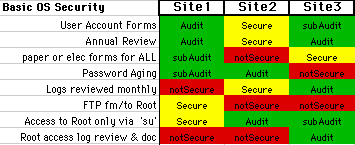
AuditColorChart tool
Introduction:
note: - this page duplicates some of the information
contained in the "Audit.html" / Audit-process page on this same web-server.
The concepts of "Audit" and the concept of the "AuditColorChart tool" are
separate, though have similar goals.
Auditing as a process / goal is much different than the auditing-tool that I have developed for 'measuring' (frequently between sites in different countries and/or over a period of time (say months or years)).
Please go to Audit page to learn about Audit as a process, and use this "Tool" page to learn more about the tool that we use to measure the results of the "Audit Process" or the "Audit Activity".
This home-page is the out-growth of a project, like many,
that started as a solution to a need for a tool to help me in my job &
company. It has grown to have a life of it's own, and others now share in
the use of the tool. Herein, I explain the how's & why's
in order to give you the benefit of my experience, hoping you can learn something
and "leverage" off of my work - to help you in yours.
In essence, the choice of a 'tool' to measure the outcome of your audit-activities is a 'personal choice'. In my case I had a need to have the output perform the following-functions, MANY OF WHICH you may or may not, also, need. In the quest for a single tool to solve many of my problems, I evolved, over a period of 2-3 years, the tool that I call the "Audit Color Chart Tool". This tool is nothing more than an Excel spreadsheet with some minor enhancements and there is no 'magic' to it at all. The "key component" if there is one, is the collection of the information from the Auditing process itself. YOU, TOO, can use this 'model' or 'template' in Excel, but should adapt it to YOUR NEEDS (and probably more importantly your Management's Needs...
AND, Lastly - here's how to correspond with me about the tool: MailTo: Bill


