Computing 101
for the faint-of-heart & un-initiated..
Wherein I try to explain complex concepts, simply, and for the
simple-minded...
Introduction:
Here is the text-treatment (few pictures, if any) that is what you want
to read BEFORE you buy, the "Computers for Dummies" book...
so - here-goes - let me attempt to explain some very very complex
concepts on very simple terms - using a lot of analogies...
Computing 101 - first item is Vocabulary:
The basic building-block of any discipline - be it making bread or
sending a man to the moon begins with a set of jargon, words, phrases,
concepts & most importantly a "mind-set" so that person a (the
expert) can communicate withe "Joe Average" - on the same level
playing field - so lets defne just a 'few' terms up-front, here in
this document - then I'll put in-a-link to a more lengthy list...
However - in order for you and me to communicate efficiently - even -
for you to communicate efficiently with ANY computer-geek-type, you'll
need a vocabulary (and some examples) that help you understand the
correct words & phrases to use in certain situations - this is a
lengthy-list - so - take your time...
Computer: a device which computes (adds / subtracts / multilies /
divides) - in reality almost all mathematical (computation) on an
'electronic computer' takes place as a variation on add-subtract.
We don't need to go into the (terribly involved, gorey and
complex) details here - but suffice it to say if you can add and/or
subtract you (a human) can do anything a computer can do - you're just
a bit slower than most computers, and - computers rarely get sick,
have to take care of their sick-kid, need to eat, sleep, drink coffee,
talk about football or go to the bathroom...
Most computers that the ordinary citizen is familiar with are
composed of at least these components
Hardware items are 'typically':
- CPU or 'processor unit' - which is typically housed
in a small box
- Monitor or Display (an output device) - this is the
way the computer gets information to you
- Keyboard & a mouse ("input") devices - this is
the way the comptuer gets information from you
- Network Connection - the way you and/or your computer
(usually on your behalf, but sometimes not) shares information with
other people and/or computers
- 'peripherals' - (typically) output devices - items
such as printers, plotters (output) tape-drives (input or
output), external hard(disk) drives (storage), external
'removeable media' devices - hard / floppy / Optical
(CD-ROM / CD-RW / CD-R / DVD / DVD-R) drives
Software items are 'typically':
Operating System(s) - this the software
component that is the 'middle-man' between you (the human) and the
hardware-components. It is also the 'middle-man' between your
application(s) (software) and the hardware-components. Some
examples of Operating Systems are:
- Apple Macintosh OS 9.x OS 10.x
- IBM CICS, CMS (Mainframe class operating systems)
- Linux & Variants (RedHat, Debian, SuSE, Mandrake, others)
- Microsoft Windows 95, 98, NT, 2000, XP, Me
- Unix & variants (Sun Solaris, HP-UX, IBM-AIX, etc)
Application Software - this is /
are the software that you load & run on the computer to
accomplish your goals & objectives; some examples are:
- Microsoft Office (PowerPoint, Word, Excel, etc.)
- E-mail client software tools (Netscape Messenger, Microsoft
Outlook, Eudora, Pine, Q-mail
- Quicken 20xx - accounting softwae
- Oracle, Sybase, FileMaker Pro, Access - database
- Netscape communicator / Internet Explorer / OmniWeb / Lynx -
internet web browsers
- AutoCAD, VectorWorks, MacCAD, Mentor Graphics, Cadence, Rhino -
CAD tools
- Photo-Shop - photographic re-touching & manipulation software
That's it - you're done - those three components:
- hardware
- operating systems
- applications software
that's all there is - everything fits-into one of those three
'slots'... Now - isn't that easy?
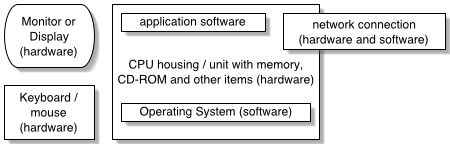
here's a simple graphic that should allow you to 'visualize' how the
pieces fit together
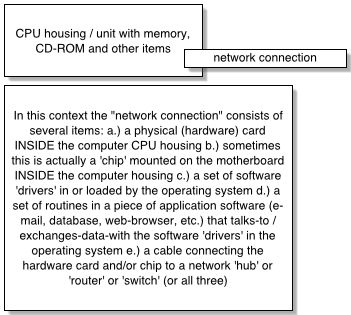
AND - for those who are really into 'detail' here's a link to a
graphic that explains the 'Network Connection'
in a bit more detail.
YEAH _ RIGHT! - there is - unfortuntely - a great deal of
complexity that falls behind each of these areas.
so - lets go back, now, and add that complexity - click on any
of these links to get to the 'detail' of that particular section:
Now that we've gone-through some more vocabulary(with examples),
lets move-onto some concepts and see if you can grasp how all the
parts 'fit together' -
some key concepts we'll
attempt to outline:
- What is the computer 'for'? (who designed it to do what ?
- How does the computer do what it does?
- Why should you care (spend money/time to put one in your business
or home?)
- Why is it 'better' to 'have your own' rather than use a computer
in a public-place (Library, Coffee-Bar, etc.
More to come here, also...
here's a brief section on Computer
E-mail: - some terms & some concepts:
here's another key-concept - that of "Common
Denominators':
Some 'Web-Site-Links' to some interesting & useful 'training
resources':
last updated:Tuesday_19Aug03; revID: 1g